
GTA 6 has attracted plenty of attention for its adult content, particularly the amount of nudity and the activities available at its strip clubs. These locations have even sparked some interesting discussions among players, including questions about how much money they've spent on dancers.
If you've ever wondered whether there's a way to check your total spending at strip clubs in GTA 6, there actually might be. The game doesn't track this expense separately, but you can use the statistics menu to estimate how much you've spent.
How to See How Much You've Spent on Strippers in GTA 6
GTA 6 doesn't include a dedicated statistic for money spent on strippers. However, these expenses are included in the Total Spent on Services figure under the Spending section of the Stats menu. By adding together the costs of other services and subtracting that amount from your overall service spending, you can estimate how much you've spent at strip clubs.
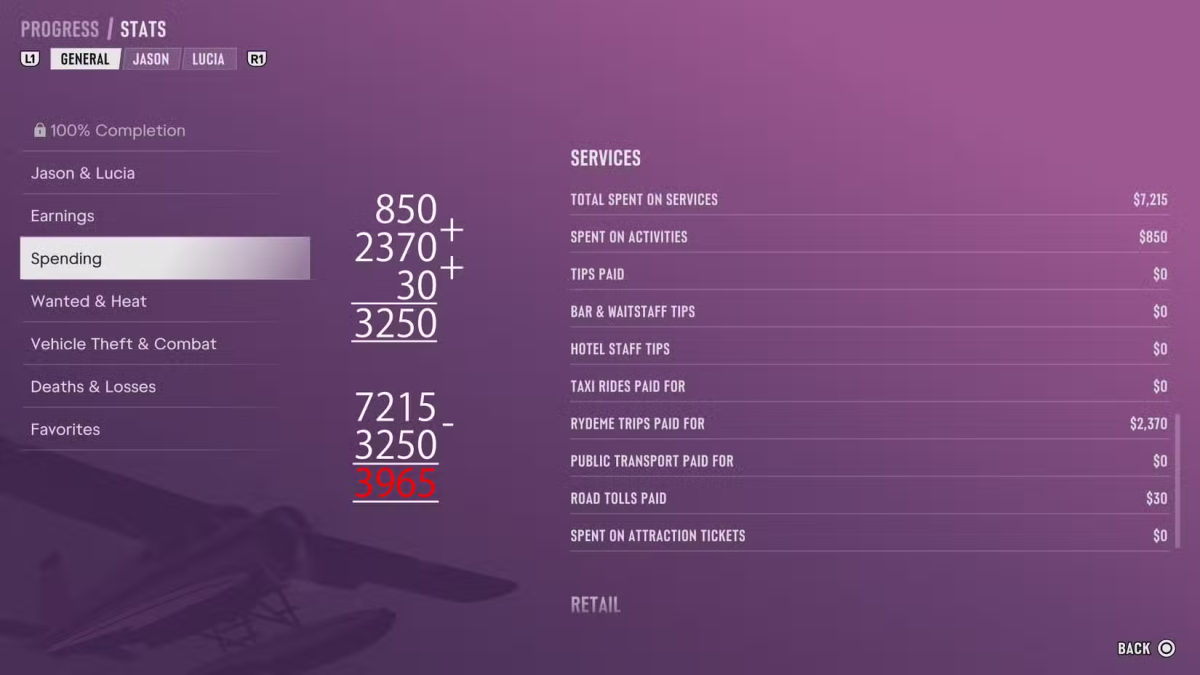
One of our guide writers has spent some time visiting strip clubs in GTA 6, so their statistics provide a useful example. When the screenshot above was taken, their spending included:
-
$850 on activities.
-
$2,370 on RydeMe trips.
-
$30 on road tolls.
These expenses add up to $3,250. Subtracting that amount from the total service spending of $7,215 leaves $3,965. This figure is consistent with the amount the writer believes they spent visiting strip clubs while researching guides.
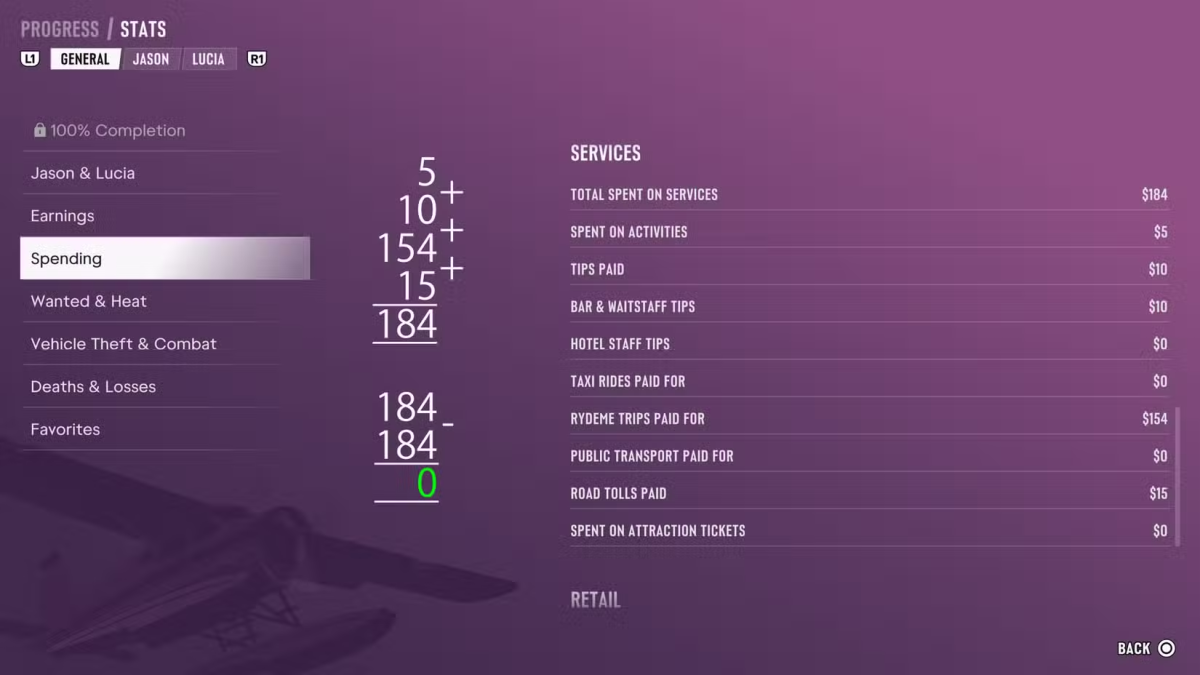
Another example comes from a player who hasn't visited any strip clubs in GTA 6. Their service spending statistics show that the individual amounts add up to the overall total, suggesting that no additional money was spent on dancers.
However, there may be other services that aren't displayed separately in the statistics. The developers' tracking system hasn't been fully confirmed, so a discrepancy between your individual expenses and Total Spent on Services doesn't necessarily prove that you've spent money at strip clubs. On the other hand, if all the figures match, it can help demonstrate that no unexplained spending has occurred.
To check your own spending, follow these steps:
-
Open the Progress menu and select Stats.
-
Use the left analog stick to scroll down to Spending.
-
Use the right analog stick to navigate to Services.
-
Add together all the individual spending values and subtract the result from Total Spent on Services.
Keep in mind that Tips Paid already combines the Bar & Waitstaff Tips and Hotel Staff Tips statistics. Don't count this figure as an additional expense when calculating the total, or you'll include the same tips twice.

Comments